Wednesday, 18 March 2015

Celebrating One Year Completion of Blogging


Happy 1 year anniversary of blogging to me !!!

That’s right, one year ago today I started my blog with a single welcome page.

Exactly one year ago, the 18 of March 2014, I was hitting the button “Publish” for the first time! At the time I didn’t really know what I was doing. My only desire was to talk about my technology and "Share What I Know" that also became the Tag Line of my Blog.

A year later the blog has 37 posts, 2,524 total views. Being a non writer I’m proud of myself for being able to stick with it, and I’m excited to keep it going. And On this Day I also would like to promise that I'll try my best to provide you guys the best content of every topic as much as possible.

Thank you all for being a part of my journey !!!

Happy CRMing and Keep Reading...? /A\/S\
Think Dynamic, Do Dynamic


Monday, 16 March 2015

Find/Fetch Notes of an Entity in Dynamic CRM 2011/2013

So many times we might have require to find or to fetch attached Notes of  a particular Entity. We can done this either using Plugin code or Javscript code.
Here I am going to share JavaScript code to perform the same :
Take a look -

function CheckNote()
{
try
{
var entityId = Xrm.Page.data.entity.getId();
alert(entityId);
var serverURL = Xrm.Page.context.getClientUrl()+"/XRMServices/2011/OrganizationData.svc";
alert(serverURL);

if(entityId)
{
var oDataQuery = serverURL+"/AnnotationSet?$filter=ObjectId/Id eq guid'"+entityId+"'";
alert(oDataQuery);
Xrm.Page.getAttribute("spousesname").setValue(oDataQuery);
$.ajax({
type: "GET",
contentType: "application/json; charset=utf-8",
datatype: "json",
url: oDataQuery,
beforeSend: function (request) { request.setRequestHeader("Accept", "application/json"); },
success: function (data, textStatus, request)
{
if(data.d.results.length > 0)
{
alert("Present");
}
else
{
alert("Not Present");
}
},
error: function (request, status, exception) { }
});

}
}
catch(e)
{
alert(e.message);
}
}


Hope this will help someone to find or retrieve Notes of an entity.

Friday, 13 March 2015

Dumps of Microsoft Dynamic CRM Certifications 2011/13

We are all well aware that a major problem in the IT industry is that there is a lack of quality study materials. 
This Blog provides you everything you will need to take a certification examination and Exam Preparation Material . Like actual certification exams, our Practice Tests are in multiple-choice (MCQs) Our Microsoft MB2-700 Exam will provide you with exam questions with verified answers that reflect the actual exam. These questions and answers provide you with the experience of taking the actual test. High quality and Value for the MB2-700 Exam:100% Guarantee to Pass Your Microsoft Dynamics CRM exam and get your Microsoft certification.

Here is the link from where you can download some most asked questions in MB2-700 Exam which will help you out to become a Microsoft CRM Certified.
https://onedrive.live.com/redir?resid=E596E7F6E13A3700!768&authkey=!AMOrM6Bpr6gSM8I&ithint=file%2crtf

Here are the dumps of MB2-703(Microsoft CRM Customization and Configuration)
https://onedrive.live.com/redir?resid=E596E7F6E13A3700!770&authkey=!ABTV1Grqvedx2mU&ithint=file%2cdocx


Dumps of Microsoft CRM 2011 Certification (Application and Customization both) -
MB2-866 & MB2-868
https://onedrive.live.com/redir?resid=E596E7F6E13A3700!769&authkey=!AMk9qNht9lCMk2U&ithint=file%2crar


Happy CRMing...All the Best

Tuesday, 3 March 2015

Dynamic CRM 2013 - Calling Custom Action using Javascript

Before reading this blog I would like to request reader to go through with below post to make clear understanding of Custom Actions or Why should I use Custom Action ;

http://arpitmscrmhunt.blogspot.in/2015/02/crm-2013-advantages-of-using-custom.html


One of the most powerful features introduced in CRM 2013 is Actions. It strongly supports the concept of XRM platform. Actions are the Custom messages which can be created for any entity or globally to perform business operations like create/update/Assign etc. (more than what a Workflow can do). Looking first time we get a feeling that it is very similar to Workflow but hold on it’s very different from WF’s or Plugins.

Below are the key points which make it different:

  • Can be associated with single entity or globally.
  • Actions support Arguments – Input and Output Arguments.
  • Can be only called through web service calls – either JavaScript/Plugins/Web through API calls.
  • Supports Rollback and executes in real time.
  • Always runs under the context of the calling user.


Arguments

Arguments are the parameters or the variables which can be used while creating the action. There are two kinds of arguments

 Input Arguments:

These are the parameters which need to be passed during action call. These can be Optional/Mandatory. For Mandatory argument it is necessary to provide some value while calling this action. These input arguments can be used as variables while performing any operation in the action.

Output Arguments:

These are the parameters which can be returned when the action is called. These can be Optional/Mandatory.

Custom Action can be call through Javascript, Plug-Ins, Custom Workflow, WebServices etc

Today I am going to share a very simple example in which I'll Call Custom Action using Javascript. In my next post i'll also share details of how it is call from Plugins.
Let's take a look the example below in which I am calling Custom Action using Javascript by passing a Input parameter to custom action. Have a look-

Requirement -
I have to update or put any message on 'Case Description' field of case Entity using Custom Action.

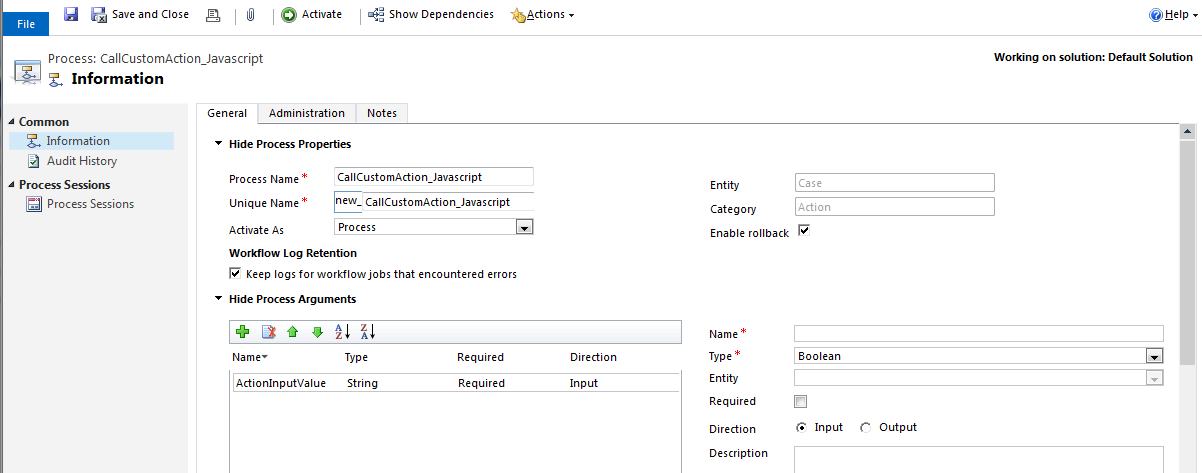
Step 1 -   Create a Custom Action (Setting > Process > Action) and Create one Input Parameter which I'll pass from Javascript while calling Action :
I am creating this Custom Action for Case Entity as shown below-
                     
Create Custom Action


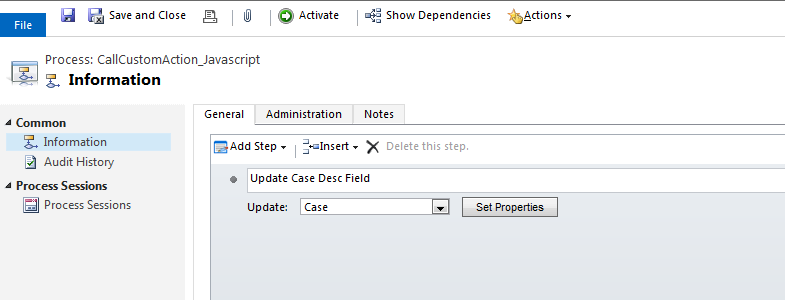
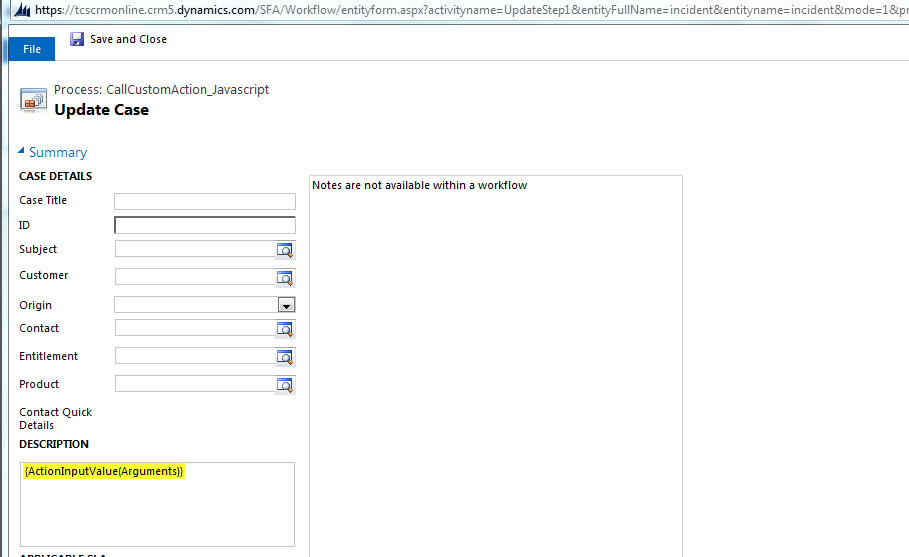
Step 2 - Put this Input Parameter in Case Description field to Update the same using Javascript as shown below :

Add Step 'Update Record'


Pass Input Parameter to Case Description field


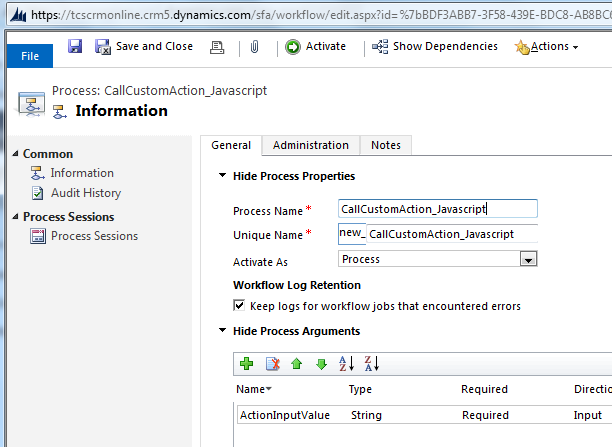
Step 3 -  Activated the Custom Action then our Custom Action Creation Step has completed.

Activate the Custom Action


Step 3 - Add below Javascript code on Case 'OnSave' Event -


function CallActionFromJavaScript() 
{
var actionInputValue = "Custom Action has been executed successfully using Javascript";
var entityId = Xrm.Page.data.entity.getId();
var entityName = "incident";
var requestName = "new_CallCustomAction_Javascript";
try
{
ExecuteActionCreateProject(actionInputValue, entityId, entityName, requestName);
Xrm.Page.data.refresh();
}
catch(e)
{
alert(e.message);
}
}

function ExecuteActionCreateProject(actionInputValue, entityId, entityName, requestName) 
{
try{
    // Creating the request XML for calling the Action
var requestXML = "";
requestXML += "<s:Envelope xmlns:s=\"http://schemas.xmlsoap.org/soap/envelope/\">";
requestXML += "<s:Body>";
requestXML += "<Execute xmlns=\"http://schemas.microsoft.com/xrm/2011/Contracts/Services\" xmlns:i=\"http://www.w3.org/2001/XMLSchema-instance\">";
requestXML += "<request xmlns:a=\"http://schemas.microsoft.com/xrm/2011/Contracts\">";
requestXML += "<a:Parameters xmlns:b=\"http://schemas.datacontract.org/2004/07/System.Collections.Generic\">";
requestXML += "<a:KeyValuePairOfstringanyType>";
requestXML += "<b:key>Target</b:key>";
requestXML += "<b:value i:type=\"a:EntityReference\">";
requestXML += "<a:Id>" + entityId + "</a:Id>";
requestXML += "<a:LogicalName>" + entityName + "</a:LogicalName>";
requestXML += "<a:Name i:nil=\"true\" />";
requestXML += "</b:value>";
requestXML += "</a:KeyValuePairOfstringanyType>";
requestXML += "<a:KeyValuePairOfstringanyType>";
requestXML += "<b:key>ActionInputValue</b:key>";
requestXML += "<b:value i:type=\"c:string\" xmlns:c=\"http://www.w3.org/2001/XMLSchema\">" + actionInputValue + "</b:value>";
requestXML += "</a:KeyValuePairOfstringanyType>";
requestXML += "</a:Parameters>";
requestXML += "<a:RequestId i:nil=\"true\" />";
requestXML += "<a:RequestName>" + requestName + "</a:RequestName>";
requestXML += "</request>";
requestXML += "</Execute>";
requestXML += "</s:Body>";
requestXML += "</s:Envelope>";
var req = new XMLHttpRequest();
req.open("POST",GetClientUrl(), false)
req.setRequestHeader("Accept", "application/xml, text/xml, */*");
req.setRequestHeader("Content-Type", "text/xml; charset=utf-8");
req.setRequestHeader("SOAPAction", "http://schemas.microsoft.com/xrm/2011/Contracts/Services/IOrganizationService/Execute");
req.send(requestXML); 
//Get the Resonse from the CRM Execute method
}
catch(e)
{
alert(e.message);
}
}

function GetClientUrl() 
{
if (typeof Xrm.Page.context == "object") 
{
clientUrl = Xrm.Page.context.getClientUrl();
}
var ServicePath = "/XRMServices/2011/Organization.svc/web";
return clientUrl + ServicePath;
}

Step 4 - Test Custom Action by Creating New Case or Click Save on any existing case:
You will find Case Description field Contain message that i have passed to custom action through javscript (Highlighted above with Yellow color)


As a CRM developer, introduction to Custom Actions in this CRM 2013 release is really a great improvement from CRM’s perspective which will help us to minimize the coding part and also achieve some complex requirement easily.

Happy Reading!!!!!

Friday, 27 February 2015

Powerpoint Presentation (PPT) of Microsoft Dynamic CRM

So many times you might have asked  to present. what Dynamic CRM actually is, in front of Dynamic CRM new comers or You might have to give training or to make understand to those who are not aware about this Product.
I googled allot but i didn't get any Presentation where explained slide by slide about Dynamic CRM Today I am going to share one Powerpoint Presentation which could help you out in future who want to present CRM overview in brief to anyone.

Here is the link below from where you can download the PPT and can use/update according to our content.

https://onedrive.live.com/redir?resid=E596E7F6E13A3700!756&authkey=!ALie3HTtZ2Iwmp0&ithint=file%2cpptx

Hope this PPT will help someone to make understand Dynamic CRM to others.

Happy CRMing...Enjoy :)

Wednesday, 25 February 2015

CRM 2013 - Routing Rule Set in Dynamic CRM

Microsoft Dynamics CRM 2013 introduced a new feature that allows us to define case routing rules. We can set up different queues based on different business scenarios and then define case routing rules to route cases to these queues (Note: we can have only one routing rule set active at a time).
To define routing rules we can navigate to Settings -> Service Management.


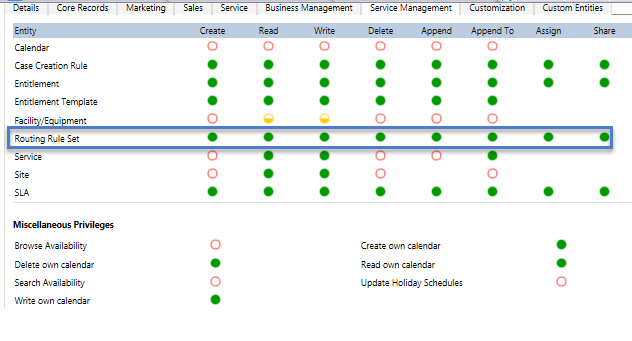
Any user with appropriate permission on Routing Rule Set can create and modify routing rules.


In my scenario, Cases are getting created in CRM from various sources like Phone, Web, Email, Facebook, Twitter etc. I want to route cases to respective users based on Case Origin.
For Example - Case coming from PHONE should be routed to User A
                       Case coming from WEB should be routed to User B and so on...

To create Routing Rule, we need to follow below mentioned instructions :


Navigate to Settings --> Service Management --> Routing Rule Set --> New


Fill routing rule set name, Let’s say “Case Routing based on Source of Case” and then Click on Save button under command bar


Click on plus + sign on Rule Item sub grid to create rule


Define routing rule like following screen and click on Save and Close on rule item window

.After creating all rules based on Case Origin, Final screen will look like below


Activate the Routing Rule Set and close the window


Select Cases of different-different Sources as shown below and Click on 'Apply Routing Rule' on Command Bar


After Clicking on button you will see that Cases has been assigned to respective Users based on its origin like below :


Hope this article will help someone to create different Routing Rule Set based upon requirements...

Happy CRMing...Enjoy

Thursday, 19 February 2015

CRM 2013 - Advantages of using Custom Action

One of the most asked question after introducing CRM 2013 is Why Custom Action ?

CRM 2013 is not merely about UI Refreshment. It’s also coming with new great features.
In this post, I would like to you know about one of the great features : CUSTOM ACTIONS.


Overview


Action in CRM 2013 is definitely a process that allows a non developer user to create it and add some logic same as well as Workflow, but Action is only be able to be called or triggered by a custom code, it can be client or server code, meaning that Javascript and C# can call Action.

So, we can combine logic from developer and non-developer to implement a business logic using Action. Actions can be defined for an entity, but Actions also can support for Global entity, meaning that not merely tied to a specific entity. Actions can be used to several CRM messages, such as CRUD, Assign, Set State, etc. It enables solution architect to extend and explore the xRM platform.


Specification


1. Action can be used to Global entity and a specific entity.
2. Custom Action can help you to extend xRM Platform
3. Custom Action can be triggered using Javascript or C#, or another language using CRM API, such as SOAP or REST methods.
4. Custom Action need to be activated first and can be edited later
5. Custom Action can be used to set static and dynamic field value
6. The most interesting thing is Custom Action can be used as Custom Message or Event Handle and can be registered by using Plugin Registration Tool! It means that you can extend xRM and do anything using this new custom message.
Such as : onSubmittedApproval Message, onCalculatedField, or whatever you want.
7. Do you know that you also can use Action to receive some input, do validation, and then manipulate the output? For example, for Approval Process needs validation and formula calculation.


Why We Should Use Action and When?


You can use Action anywhere and anytime. Wherever and whenever you need it since both client and server code supports this calling.
What scenario or business idea you can achieve using custom Action?


1. Say partial good-bye to Custom Entity that so-called as Configuration Entity


Last time using CRM 4 or CRM 2011, I remember I always use Configuration Entity or Configurable Parameter to store some information that can be called by third party application, such as Console or Web App or event Web Part from SharePoint that we can develop. Or for outside application, I can use web.config or app.config with encryption, etc.
For example : to store server URL, username and password, additional settings, such as : maximum permitted credit card account for each Customer, maximum Membership card for each Member, minimum monthly fee for rental as commitment, enable for approval checkin (yes/no) then if Yes, do something, if No then stops it, due date for submitting an activity for each month, etc. There are real condition that we often face and we cannot do hard-coding, right.
Let’s say after an Order created, then pass the information to Navision (integration to Navision), then we have to detect in the Plugin onCreate, pass information to which Navision Server? Then what we do is by reading a custom entity so-called Configuration. It’s fine to use this conventional way, but don’t forget to make validation as well, cannot have more than one record to store Navision Server URL, don’t want to make system being confused.
Now, you can achieve this.


2. To show a Custom Error Messages


Many times, we have plugin and we should show a error messages, for example : “Please input ‘City’ value! or ‘City’ cannot be blank!
Then, what we do often is do hard-code in the Plugin or again, using the first method, reading Configuration entity that store some error messages.
Imagine, you have many plugins and you have to reading that entity and imagine that you have to change your words later. For example, now the message is “Please input ‘City’ value!, then later your customer says I don’t want to use that statement, I want a more polite word : “Sir/Madam, please fill the ‘City’ value. The developers statement for some errors can be different from what customer want, and what happened if you hard-code it.


3. Custom action as Custom Message


Several times, I was being forced to trigger a plugin using JavaScript by creating a dummy record to fix a complex business flow requiring a complex code. Custom action can be used as custom action and you can register your action same as well you register your Plugin Message.


4. Custom action to solve complex Business Requirement


I often have requirement that should be easier if I code it using server code, for example : Calculation, Approval, Third Party Integration, such as SMS, Product Configuration, the want they I can do is I have to write a custom code of workflow activity, a custom web service, a batch scheduler job, or trigger a plugin.
Using action, based on point number #3, since Custom action can be used as custom message, then we can use Custom Action to implement our complex logic and it is easy to call custom action. To know more about this, I promise I will give you example on my next posts.


5. Custom action is a single point of integration.


Can you imagine if you are trying to do integration for other system, both inbound or outbound that you should write many custom code.
For example, if you want to pass information from your website to CRM, then you can do either you write code in your website code call CRM API, or you use web service, let’s say you are trying to have a business logic for creating a lead from several websites and POS System, and as well you can create directly using CRM Import Wizard. How many point of gate you have?

Imagine, you have 3 websites (one for case support and enquiry, one is forum discussion, one is public official website), 2 Desktop Apps (one is for Agent at a branch and one is you put at kiosk), and 1 Console Job Application (for retrieving data every day collecting Social Media interaction), then you have at least 6 gates from your another application that customer wants you to let them generating lead or contact from all of six apps.
Then what you is you can implement your code of all of your 6 apps, imagine you have 6 apps but all of them having one purpose and having a lot of Input Arguments that should be same, then you have to do 6 times, implement your code, or smart way is you can use a web service to be called by them. Instead using web service, you can using Action (refer to point number #2, you can use Custom Action as Custom Message).

Okay, I think better if we got an example, please refer to my next posts.

In my next posts you will get to know how Custom Action use in CRM and how it is call using Javascript.

http://arpitmscrmhunt.blogspot.in/2015/03/dynamic-crm-2013-calling-custom-action.html
Blogger Widgets