Monday, 8 January 2018

Customize Home Page in CRM Portal


Have a look this Video :


Hello Everyone, If you are looking for customizing the CRM Portal Home Page UI, This article is for you.

For demonstration, Let's take a simple example:

Suppose my client requirement is to show different Home Page UI for Anonymous and Authenticated Users - So If an anonymous user visits my portal, he/she should be able to view company image slider and if the user is authenticated then OOB UI should be visible.

So Let's quickly understand what we need to do for the same:

Note - Please take a copy of OOB Home Web Template code before start making any changes.

Step 1: Open Home Web Template (Portals > Web Templates > Home)


Step 2: Write Code to check whether user is Anonymous or Authenticated


{% if user %}


 User is Authenticated

{% else if %}
   
 User is Anonymous

{% endif %}


Step 3: Paste the below code (or that you had copied as a backup) between the 

{% if user %} and {% else if %} block.

{% if user %}

{% assign forums_sm = sitemarkers["Forums"] %}

<section class="page_section section-landing">
  <div class="container">
    <div class="row ">
      <div class="col-md-12">
        <h1 class="section-landing-heading">{% editable snippets 'Home/Title' 
default: 'Contoso' %}</h1>
        <h2 class="section-landing-sub-heading">{% editable snippets 'Home/Subtitle' 
default: 'Customer' %}</h2>
        {% include 'Search' %}
      </div>
    </div>
  </div>
  <div class="layer_down">&nbsp;</div>
</section>
<section class="page_section section-knowledge">
  <div class="layer_up">&nbsp;</div>
  <div class="container">
    <div class="content-home">
      <h2 class="blue_border">{% editable snippets "Home/MostPopularHeading" 
default: resx["Most_Popular"] %}</h2>
      {% include 'Knowledge Management - Most Popular Articles' showdescription: true %}
    </div>
    <div class="row sidebar-home no-lr-margins">
      <div class="col-md-4">{% include 'Knowledge Management - 
Most Popular Articles' showdescription: false %}</div>
      <div class="col-md-4">{% include 'Knowledge Management - 
Most Recent Articles' %}</div>
      <div class="col-md-4">{% include 'Knowledge Management - 
Top Rated Articles' %}</div>
    </div>
  </div>
</section>
<section class="page_section section-sub-landing color-inverse">
  <div class="container">
    <div class="row">
      <div class="col-md-4 text_center-mobile">
        <h1>{{ forums_sm.adx_name | escape }}</h1>
        {% editable snippets "Forum/HomeDescription" %}
        <a href="{{ forums_sm.url | h }}" class="btn btn-info-home btn-lg-home" 
title="{{ snippets['Home/ViewMoreButton'] | default: resx['View_More'] | h }}">
{{ snippets['Home/ViewMoreButton'] | default: resx['View_More'] | h }}</a>
      </div>
    </div>
  </div>
</section>
  {% else if %}


Step 4: Paste the below code between {% else if %} and {% endif %} block.


<!DOCTYPE html>
 <html lang="en">
 <head>
   <title>Bootstrap Example</title>
   <meta charset="utf-8">
   <meta name="viewport" content="width=device-width, initial-scale=1">
   
   
   <script src="https://ajax.googleapis.com/ajax/libs/jquery/1.10.2/jquery.min.js"></script>
   
   <style>
   .carousel-inner > .item > img,
   .carousel-inner > .item > a > img {
    width: 100%;
    margin: auto;
   }
   #gethelp{
   
   display:none;
   
   }
   footer .footer-bottom
   {
    display:none;
   }
   .navbar-static-top.navbar-inverse{
   
   background-color: #0303bf;
  color: white;
   
   }
   footer .footer-top{
   
  background-color: #0303bf;
  color: white;
  margin-top: 23px;
   
   }
   body{
   
   background-color: darkgray;
    
   
   }
   </style>
 </head>
 <body>

 <div class="container">
   <br>
   <div id="myCarousel" class="carousel slide" data-ride="carousel">
  <!-- Indicators -->
  <ol class="carousel-indicators">
    <li data-target="#myCarousel" data-slide-to="0" class="active"></li>
    <li data-target="#myCarousel" data-slide-to="1"></li>
    <li data-target="#myCarousel" data-slide-to="2"></li>
    <li data-target="#myCarousel" data-slide-to="3"></li>
  </ol>

  <!-- Wrapper for slides -->
  <div class="carousel-inner" role="listbox">

    <div class="item active">
   <img src="sliderimg1" alt="Chania" width="460" height="320">
   <div class="carousel-caption">
    
   </div>
    </div>

    <div class="item">
   <img src="sliderimg2" alt="Chania" width="460" height="320">
   <div class="carousel-caption">
    
   </div>
    </div>
  
    <div class="item">
   <img src="sliderimg3" alt="Flower" width="460" height="320">
   <div class="carousel-caption">
     
   </div>
    </div>

    <div class="item">
   <img src="sliderimg4" alt="Flower" width="460" height="320">
   <div class="carousel-caption">
    
   </div>
    </div>
   
  </div>

  <!-- Left and right controls -->
  <a class="left carousel-control" href="#myCarousel" role="button" data-slide="prev">
    <span class="glyphicon glyphicon-chevron-left" aria-hidden="true"></span>
    <span class="sr-only">Previous</span>
  </a>
  <a class="right carousel-control" href="#myCarousel" role="button" data-slide="next">
    <span class="glyphicon glyphicon-chevron-right" aria-hidden="true"></span>
    <span class="sr-only">Next</span>
  </a>
   </div>
 </div>

 </body>
 </html>

{% endif %}

Here "sliderimg1", "sliderimg2", "sliderimg3", "sliderimg4" are the images I have uploaded in Web Files.


Step 4: So the final code for Home Web Template is:


{% if user %}

{% assign forums_sm = sitemarkers["Forums"] %}

<section class="page_section section-landing">
  <div class="container">
    <div class="row ">
      <div class="col-md-12">
        <h1 class="section-landing-heading">{% editable snippets 'Home/Title' 
default: 'Contoso' %}</h1>
        <h2 class="section-landing-sub-heading">{% editable snippets 'Home/Subtitle' 
default: 'Customer' %}</h2>
        {% include 'Search' %}
      </div>
    </div>
  </div>
  <div class="layer_down">&nbsp;</div>
</section>
<section class="page_section section-knowledge">
  <div class="layer_up">&nbsp;</div>
  <div class="container">
    <div class="content-home">
      <h2 class="blue_border">{% editable snippets "Home/MostPopularHeading" 
default: resx["Most_Popular"] %}</h2>
      {% include 'Knowledge Management - Most Popular Articles' showdescription: true %}
    </div>
    <div class="row sidebar-home no-lr-margins">
      <div class="col-md-4">{% include 'Knowledge Management - 
Most Popular Articles' showdescription: false %}</div>
      <div class="col-md-4">{% include 'Knowledge Management - 
Most Recent Articles' %}</div>
      <div class="col-md-4">{% include 'Knowledge Management - 
Top Rated Articles' %}</div>
    </div>
  </div>
</section>
<section class="page_section section-sub-landing color-inverse">
  <div class="container">
    <div class="row">
      <div class="col-md-4 text_center-mobile">
        <h1>{{ forums_sm.adx_name | escape }}</h1>
        {% editable snippets "Forum/HomeDescription" %}
        <a href="{{ forums_sm.url | h }}" class="btn btn-info-home btn-lg-home" 
title="{{ snippets['Home/ViewMoreButton'] | default: resx['View_More'] | h }}">
{{ snippets['Home/ViewMoreButton'] | default: resx['View_More'] | h }}</a>
      </div>
    </div>
  </div>
</section>
 
{% else if %}
   
<!DOCTYPE html>
<html lang="en">
<head>
  <title>Bootstrap Example</title>
  <meta charset="utf-8">
  <meta name="viewport" content="width=device-width, initial-scale=1">
  
  
  <script src="https://ajax.googleapis.com/ajax/libs/jquery/1.10.2/jquery.min.js"></script>
  
  <style>
  .carousel-inner > .item > img,
  .carousel-inner > .item > a > img {
      width: 100%;
      margin: auto;
  }
  #gethelp{
  
  display:none;
  
  }
  footer .footer-bottom
  {
   display:none;
  }
  .navbar-static-top.navbar-inverse{
  
  background-color: #0303bf;
    color: white;
  
  }
  footer .footer-top{
  
    background-color: #0303bf;
    color: white;
    margin-top: 23px;
  
  }
  body{
  
  background-color: darkgray;
   
  
  }
  </style>
</head>
<body>

<div class="container">
  <br>
  <div id="myCarousel" class="carousel slide" data-ride="carousel">
    <!-- Indicators -->
    <ol class="carousel-indicators">
      <li data-target="#myCarousel" data-slide-to="0" class="active"></li>
      <li data-target="#myCarousel" data-slide-to="1"></li>
      <li data-target="#myCarousel" data-slide-to="2"></li>
      <li data-target="#myCarousel" data-slide-to="3"></li>
    </ol>

    <!-- Wrapper for slides -->
    <div class="carousel-inner" role="listbox">

      <div class="item active">
        <img src="/sliderimg1" alt="Chania" width="460" height="320">
        <div class="carousel-caption">
         
        </div>
      </div>

      <div class="item">
        <img src="sliderimg2" alt="Chania" width="460" height="320">
        <div class="carousel-caption">
         
        </div>
      </div>
    
      <div class="item">
        <img src="sliderimg3" alt="Flower" width="460" height="320">
        <div class="carousel-caption">
          
        </div>
      </div>

      <div class="item">
        <img src="sliderimg4" alt="Flower" width="460" height="320">
        <div class="carousel-caption">
         
        </div>
      </div>
  
    </div>

    <!-- Left and right controls -->
    <a class="left carousel-control" href="#myCarousel" role="button" data-slide="prev">
      <span class="glyphicon glyphicon-chevron-left" aria-hidden="true"></span>
      <span class="sr-only">Previous</span>
    </a>
    <a class="right carousel-control" href="#myCarousel" role="button" data-slide="next">
      <span class="glyphicon glyphicon-chevron-right" aria-hidden="true"></span>
      <span class="sr-only">Next</span>
    </a>
  </div>
</div>

</body>
</html>

{% endif %}

Cheers 😎

Sunday, 7 January 2018

Dynamics 365 Latest Version V9 - Unable To Connect Plugin Registration Tool and External Application

Hello Everyone,

If you have recently made Dynamic CRM Trial and started facing issues while connecting it through Plugin Registration Tool, Configuration Migration Tool, External Application like console, web app, window form app etc then this article is for you.

Latest Update on Dynamics CRM V9:


Latest update in the Microsoft TSL(Transport Security Layer) Protocol in SDK assemblies.

Microsoft allowed the TSL connection 1.0  and 1.1 for the browsers or client to connect the CRM org. Now Microsoft will support only TSL 1.2 or above. Can get more information here

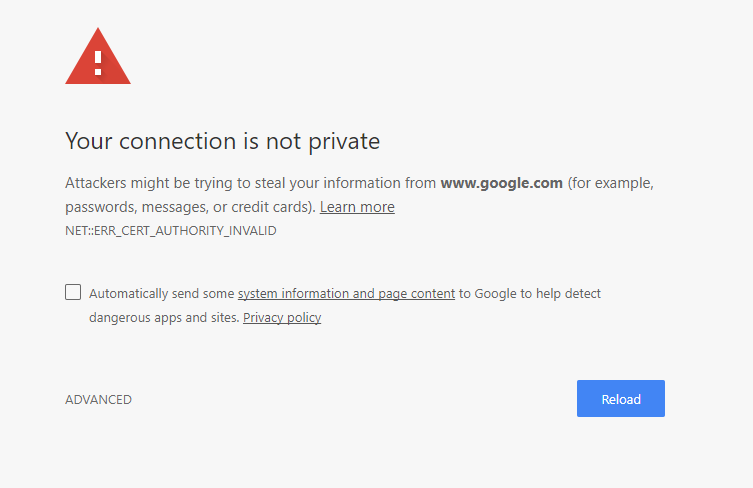
If you are connecting your latest dynamic CRM trial org with the old version of plugin registration tool or connecting any external application, then you may face an issue.

How would I get to know about Protocol Version of my system?


Install Fiddler:


Install fiddler from here.

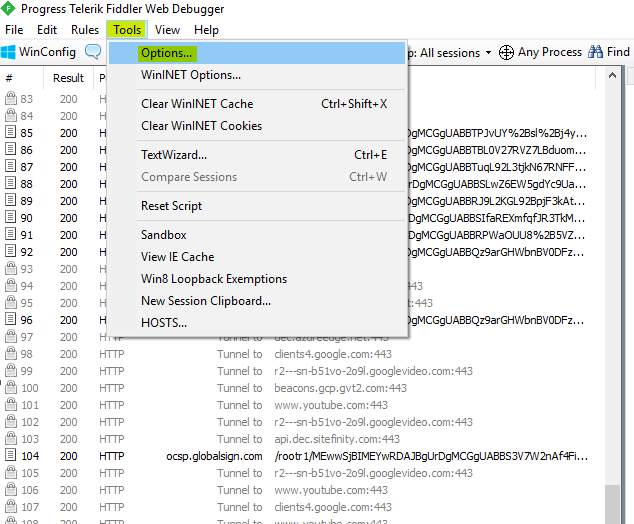
Once Fiddler gets installed, Go to Tools > Options in order to check Protocol version:


Issue Observed:


Issue 1

Microsoft.Xrm.Tooling.Connector.CrmServiceClient Error 2 07-Jan-18 1:06:56 PM  Source : mscorlib
Method : GetResultCore
Date : 07-Jan-18
Time : 1:06:56 PM
Error : One or more errors occurred.
Stack Trace : at System.Threading.Tasks.Task`1.GetResultCore(Boolean waitCompletionNotification)
   at Microsoft.Xrm.Tooling.Connector.CrmWebSvc.ExecuteAuthenticateServiceProcess(Uri serviceUrl, ClientCredentials clientCredentials, UserIdentifier user, String clientId, Uri redirectUri, PromptBehavior promptBehavior, String tokenCachePath, Boolean isOnPrem, String authority, Uri& targetServiceUrl, AuthenticationContext& authContext, String& resource)
   at Microsoft.Xrm.Tooling.Connector.CrmWebSvc.ConnectAndInitCrmOrgService(OrganizationDetail orgdata, Boolean IsOnPrem, Uri homeRealmUri)
   at Microsoft.Xrm.Tooling.Connector.CrmWebSvc.InitCRM2011Service()
======================================================================================================================
Inner Exception Level 1
Source : Microsoft.IdentityModel.Clients.ActiveDirectory
Method : Close
Date : 07-Jan-18
Time : 1:06:56 PM
Error : Object reference not set to an instance of an object.
Stack Trace : at Microsoft.IdentityModel.Clients.ActiveDirectory.HttpWebResponseWrapper.Close()
   at Microsoft.IdentityModel.Clients.ActiveDirectory.AuthenticationParameters.<CreateFromResourceUrlCommonAsync>d__0.MoveNext()
--- End of stack trace from previous location where exception was thrown ---
   at System.Runtime.ExceptionServices.ExceptionDispatchInfo.Throw()
   at System.Runtime.CompilerServices.TaskAwaiter.HandleNonSuccessAndDebuggerNotification(Task task)
   at Microsoft.IdentityModel.Clients.ActiveDirectory.AuthenticationParameters.<CreateFromResourceUrlAsync>d__8.MoveNext()
======================================================================================================================

Microsoft.Xrm.Tooling.Connector.CrmServiceClient Error 2 07-Jan-18 1:06:56 PM  Unable to Login to Dynamics CRM
Microsoft.Xrm.Tooling.CrmConnectControl Information 8 07-Jan-18 1:06:56 PM  Login Status in Connect is =  Can't connect to Microsoft Dynamics CRM - orged437722.


Issue 2:

Source : Microsoft.Xrm.Tooling.Connector
Method : RegisterDevice
Date : 30-Dec-17
Time : 12:58:25 PM
Error : DeviceAlreadyExists: 0x80041132
Stack Trace : at Microsoft.Xrm.Tooling.Connector.DeviceIdManager.RegisterDevice(Guid applicationId, Uri issuerUri, LiveDevice device)
   at Microsoft.Xrm.Tooling.Connector.DeviceIdManager.RegisterDevice(Guid applicationId, Uri issuerUri, String deviceName, String devicePassword)
   at Microsoft.Xrm.Tooling.Connector.DeviceIdManager.LoadOrRegisterDevice()
   at Microsoft.Xrm.Tooling.CrmConnectControl.CrmConnectionManager.GenerateDeviceCreds()
   at Microsoft.Xrm.Tooling.CrmConnectControl.CrmConnectionManager.ValidateServerConnection(CrmOrgByServer selectedOrg)

Resolution:


To resolve Plugin Registration Tool Issue, you need to install Latest Plugin Registration Tool from NuGet website instead of 365 SDK.


To download the Plugin Registration Tool from NuGet Package Tool site, you have two options.

Option 1:

Navigate to Tools >  NuGet Package Manager > Package Manager Console


Run Command :

Install-Package Microsoft.CrmSdk.XrmTooling.PluginRegistrationTool -Version 9.0.0.7

See this link for more info.


Option 2:

Open Visual Studio and Create any Sample Project for example: Create a Class Library Project.


Right Click on Project and click Manage NuGet Packages...


Click on Online from the Left panel and Search 'Microsoft.CrmSdk.XrmTooling.PluginRegistrationTool' and click on Install.


Once installed Right click on Project to view the installed package


Open package and Navigate to below path:

\packages\Microsoft.CrmSdk.XrmTooling.PluginRegistrationTool.9.0.0.7\tools


Open Plugin Registration Tool


Make sure the version of Microsoft.Xrm.Sdk version is 9.0


Enter your organisation details and Connect Plugin Registration Tool.


To resolve External Application connection issue.


.For Custom Application like Console/WebApp/WindowApp:App :

Include the below reference to your project (to global config file the line before where your client credentials is configured) and change .Net framework to 4.6.1 and rebuild

"ServicePointManager.SecurityProtocol = SecurityProtocolType.Tls11 | SecurityProtocolType.Tls12"


Source http://mscrm365.blogspot.in/2018/01/dynamics-crm-v9-connection-error-in.html


To resolve Report Issue:


Uninstall Report Authoring Extension and install the latest.(Make sure Installed dll is the latest SDK 9.0).

If you do not want to perform all the above steps and want to continue with Old SDK, Change your system protocol setting as per below instructions using Fiddler.


Click <client;ssl3;tls1.0> (highlighted above) and change Protocol to tls1.2 and click OK


Warning: You may start getting the Internet Connection Issue after doing this setting. So recommend to download the latest tool from NuGet Package instead of this setting.


Sunday, 31 December 2017

Customize Registration Page in CRM Portals

Customise Portal Registration Page

Create a Content Snippet record (Portal > Content Snippet >New) with below details:
Name : Account/Register/PageCopy
Website : <website name>
Type : Html
Value: write your own HTML/DOM/JQuery code to add your custom controls and perform validations.

Customise Portal Login Page

Create a Content Snippet record (Portal > Content Snippet >New) with below details:
Name : Account/SignIn/PageCopy
Website : <website name>
Type : Html
Value: write your own HTML/DOM/JQuery code to add your custom controls and perform validations.

Visit : http://arpitmscrmhunt.blogspot.in/2017/05/edit-stylelayout-of-login-page-in-crm.html

Here is the sample code snippet for Registration Page:

In this example, I am adding two additional fields (Date of Birth and SSN) on Portal Registration Page.

// Code to add custom Date Of Birth Field
$('#ContentContainer_MainContent_MainContent_ShowUserName').next().next().after('<div class="form-group"><label class="col-sm-4 control-label required"><span id="ContentContainer_MainContent_MainContent_dob"><span class="xrm-editable-text xrm-attribute"><span class="xrm-attribute-value">Date Of Birth</span></span></span></label><div class="col-sm-8"><input id="ContentContainer_MainContent_MainContent_dob" class="form-control" aria-required="true"></div></div>');

// Code to add custom SSN Field
$('#ContentContainer_MainContent_MainContent_ShowUserName').next().next().after('<div class="form-group"><label class="col-sm-4 control-label required"><span id="ContentContainer_MainContent_MainContent_ssn"><span class="xrm-editable-text xrm-attribute"><span class="xrm-attribute-value">SSN</span></span></span></label><div class="col-sm-8"><input id="ContentContainer_MainContent_MainContent_ssn" class="form-control" aria-required="true"></div></div>');

//Code to Add Custom 'Register' Button and Hide the original one
$('#SubmitButton').after('<input type="submit" name="ctl00$ctl00$ContentContainer$MainContent$MainContent$mySubmitButton" value="Register" id="mySubmitButton" class="btn btn-primary">');

$('#SubmitButton').hide();


//Now you can handle the click of custom 'Register' button.
$("#mySubmitButton").click(function()
{
if(all validation pass)
{
var ssnInput = $('#ContentContainer_MainContent_MainContent_ssn').val();
var dobInput= $('#ContentContainer_MainContent_MainContent_dob').val();
localStorage.setItem("ssn", ssnInput );
localStorage.setItem("dob", dobInput);
$('#SubmitButton').click();
}
else
{
alert('throw error');
}
});
//Above Code Means :
// If all the validation pass then: store SSN and DOB in local storage and trigger click on the actual register button else throw your custom error message.
// We will have to store SSN and DOB in cache/localstorage, because we don't have a direct way to store it in CRM. Other data portal will automatically store in CRM like : Email, Username, Password, Confrm Password.

// As soon as user will be redirected to profile page after successful registration, we can write below two line of code in profile webpage (under custom javascript) section to get the SSN and DOB from cache or local storage and put it in profile custom SSN and DOB fields in order to store it in CRM.

$(document).ready(function(){
$('#profilepage_SSN_field').val(localStorage.getItem("ssn"));
$('#profilepage_DOB_field').val(localStorage.getItem("dob"));
localStorage.clear();
});

Complete Code :


<script>
   changeRegistraionPageUI();
  function changeRegistraionPageUI()
  {
     $(window).load(function() {

 // Code to add custom Date Of Birth Field
$('#ContentContainer_MainContent_MainContent_ShowUserName').next().next().
after('<div class="form-group"><label class="col-sm-4 control-label required"><span 
id="ContentContainer_MainContent_MainContent_dob"><span class="xrm-editable-text xrm-attribute">
<span class="xrm-attribute-value">Date Of Birth</span></span></span></label><div class="col-sm-8">
<input id="ContentContainer_MainContent_MainContent_dob" class="form-control" aria-required="true">
</div></div>');

// Code to add custom SSN Field
$('#ContentContainer_MainContent_MainContent_ShowUserName').next().next().
after('<div class="form-group"><label class="col-sm-4 control-label required">
<span id="ContentContainer_MainContent_MainContent_ssn">
<span class="xrm-editable-text xrm-attribute">
<span class="xrm-attribute-value">SSN</span></span></span></label>
<div class="col-sm-8"><input id="ContentContainer_MainContent_MainContent_ssn" 
class="form-control" aria-required="true"></div></div>');

//Code to Add Custom 'Register' Button and Hide the original one
$('#SubmitButton').after('<input type="submit" 
name="ctl00$ctl00$ContentContainer$MainContent$MainContent$mySubmitButton" 
value="Register" id="mySubmitButton" class="btn btn-primary">');

$('#SubmitButton').hide();
});
  }
</script>


Change Look and Feel of Registration Page :


$("#ContentContainer_MainContent_MainContent_SecureRegister").css({"background-color": "antiquewhite", "border-style": "groove", "border-radius": "18px", "width": "90%", "margin-left": "auto", "margin-right": "auto", "padding": "18px", "box-shadow":"5px 11px 47px black","margin-top":"-15px"});


Cheers
Blogger Widgets